Text Messages
Account codes from UniSight, plus planned customer receipt and manager-assistance texts. Last updated October 23, 2026.
Who Sends These Messages
UniSight BIT Inc., doing business as UniSight, is the sender of the programs described here. Account and security texts contain sign-in or enrollment verification codes. Our planned receipt and manager-assistance texts identify the sender as UniSight for [Store], with the relevant store or branch named in the message.
These are informational messages. They do not include promotions. A store joining UniSight does not enroll its customers or employees in text messages.
Receipt texts and manager-assistance SMS are planned programs and are not yet available for enrollment. The examples below describe the intended consent process. Publishing this page does not activate those programs or establish carrier approval. This page does not collect phone numbers or consent.
Account and Security Codes
Back Office SMS is optional. An authenticator app is offered. Consent is not a condition of using UniSight Back Office. You can use Back Office without providing a mobile number and without checking the SMS consent box.
Back Office Opt-In
Back Office opt-in happens after you sign in, through an unchecked consent box. End to end:
- User signs in to UniSight Back Office at https://unisight.io.
- Opens Account → Security, or first-time two-factor setup.
- Chooses Text message and enters a mobile number.
- Checks an unchecked box agreeing to receive UniSight account/security texts.
- Sees frequency, rates, STOP/HELP, Privacy Policy, and Terms next to that box.
- Clicks Continue. UniSight then sends a one-time verification code. The number is not used for SMS until that box is checked.
The live Back Office consent screen includes a phone field, an unchecked checkbox, disclosure text, Privacy Policy and Terms links, and Continue.
Customer web-app sign-in codes are requested separately by entering a mobile number and selecting Send my code. Requesting or receiving a verification code does not enroll a customer in receipt texts, manager alerts or marketing.
Message frequency is typically 1 message per sign-in or enrollment. Message and data rates may apply. Reply STOP to cancel. Reply HELP for help.
Customer Receipt Texts — Planned
Customers will be able to choose a text when a completed store purchase is linked to their customer account. The message will name UniSight, the store and branch, and link to the receipt in the UniSight customer web app at unisight.market. Receipt texts will not contain advertising.
Planned Receipt Opt-In
- The customer signs in to the store's UniSight customer web app and chooses receipt texts for that store.
- The customer reviews a separate, optional SMS checkbox that is unchecked by default, beside the disclosure below and links to Privacy and Terms.
- The customer checks that box and saves the receipt-text preference. UniSight records consent for that customer, program and store before receipt texts can begin.
Proposed consent wording — an example, not an enrollment form:
I agree to receive text messages from UniSight BIT Inc. about receipts for purchases linked to my customer account at [Store]. Messages identify UniSight for [Store]. Typically one text per eligible completed purchase; frequency varies with my purchases. Message and data rates may apply. Reply STOP to cancel or HELP for help. Consent is not a condition of purchase or customer account membership. Privacy Policy and Terms. Support: 1-888-294-6414, privacy@unisight.com.
Sample message: UniSight for [Store] ([Branch]): Your receipt is ready. View it securely: [receipt link]. Reply STOP to cancel; HELP for help.
Manager-Assistance Texts — Planned
Managers will be able to choose operational SMS alerts for their store or branch when a cashier requests assistance at a checkout station or an employee requests a manager at a time clock. These are routine assistance requests, not an emergency-response service.
Planned Manager Opt-In
- The manager signs in to UniSight and reviews the stores and branches for which they would receive manager-assistance alerts.
- The manager enters or confirms their own mobile number and reviews a separate, optional SMS checkbox that is unchecked by default.
- The manager checks the box and saves that preference. UniSight records the recipient's consent and store/branch scope before SMS alerts can begin. Adding someone as a manager or entering their number is not consent.
Proposed consent wording — an example, not an enrollment form:
I agree to receive manager-assistance text messages from UniSight BIT Inc. for the stores and branches shown in my enrollment. Messages identify UniSight for the relevant store and report requests from checkout stations or time clocks. Frequency varies with assistance requests. Message and data rates may apply. Reply STOP to cancel or HELP for help. SMS enrollment is optional. Privacy Policy and Terms. Support: 1-888-294-6414, privacy@unisight.com.
Sample messages:
- UniSight for [Store] ([Branch]): John at Station2 is requesting manager assistance. Reply STOP to cancel; HELP for help.
- UniSight for [Store] ([Branch]): Stacy K. needs a manager at oneTime in the break room. Reply STOP to cancel; HELP for help.
Prelaunch Consent Designs
The images below show the complete proposed consent forms and the confirmation screens planned for each program. They are labelled prelaunch design mockups, not screenshots of active enrollment. No phone numbers or consent are collected through these images, and the programs are not yet open for enrollment.
- Receipt-text consent form — prelaunch design (JPEG)
- Receipt-text confirmation — prelaunch design (JPEG)
- Manager-assistance consent form — prelaunch design (JPEG)
- Manager-assistance confirmation — prelaunch design (JPEG)
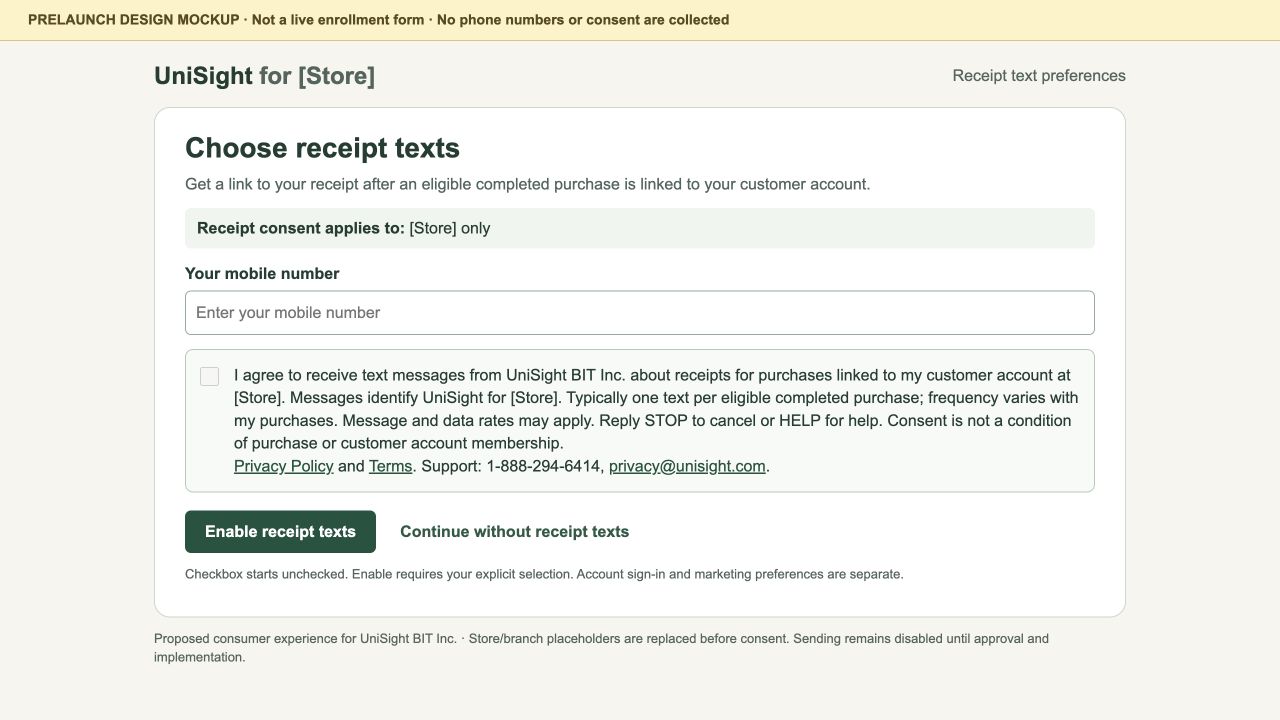
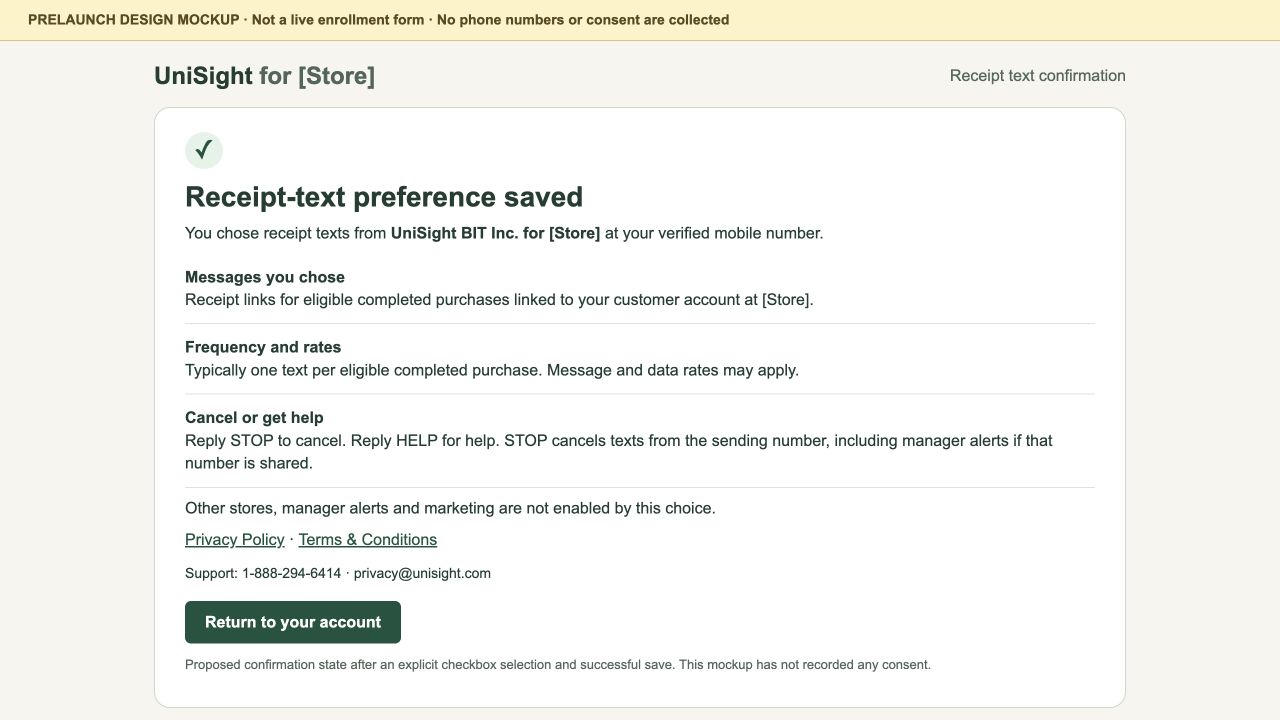
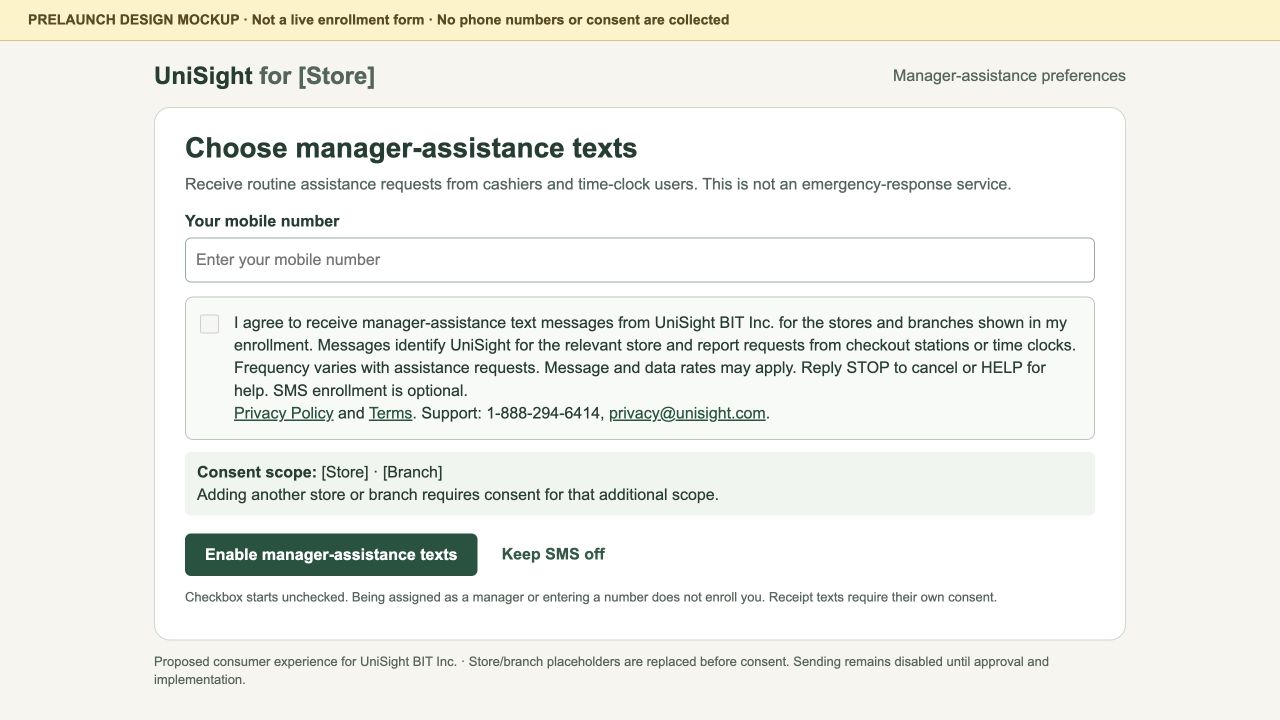
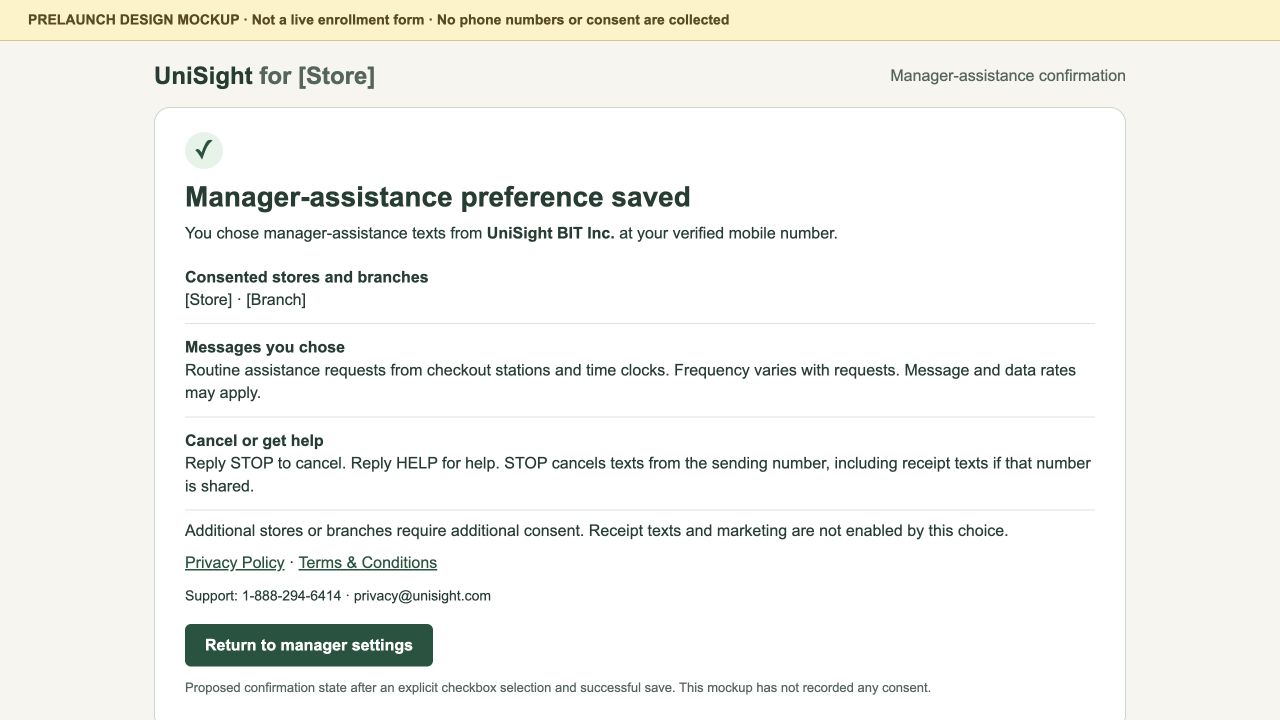
Each consent design shows the recipient's phone field, a separate unchecked SMS choice, the full disclosure above, Privacy and Terms links, and an explicit save action. Store and branch placeholders will be replaced with the recipient's actual consent scope. These designs do not establish carrier approval or activate messaging.
Separate Choices, Cancellation and Help
The planned receipt and manager programs require separate consent for their stated purposes. Accepting general terms, joining a store's customer program, providing a phone number, requesting a sign-in code or choosing marketing texts will not enroll either program.
Receipt consent will apply only to the store named at opt-in. Manager consent will apply only to the stores and branches shown in that recipient's enrollment. Adding another store or branch will require consent for that additional scope.
Reply STOP to cancel. Reply HELP for help. For the planned receipt and manager programs, STOP will stop texts from that sending number, including both programs if they share the number. A different store label does not override an opt-out.
Receipt frequency will typically be one text per eligible completed purchase. Manager-alert frequency will vary with assistance requests. Message and data rates may apply. Carriers are not liable for delayed or undelivered messages.
Support: 1-888-294-6414, privacy@unisight.com.
Privacy Policy and Terms
We do not share, sell, or provide your mobile phone number or messaging consent data to third parties or affiliates for marketing or promotional purposes.